


Imagine your infrastructure pipeline is running perfectly . . . until it isn’t. You apply a routine security patch to a Terraform module, review the plan, and hit approve. Everything looks fine in the logs. But ten minutes later your phone rings. The director of customer support is livid. Customers are flooding her team with calls over orders processing incorrectly. When you investigate, you discover that a two-day-old version of the application was quietly re-deployed, reverting critical business logic changes, without a single alert. You had no idea. But now, you are responsible for cleaning up a customer-facing, revenue-impacting mess. This is the result of version drift, the inevitable consequence of two deployment systems that do not share a source of truth.
The good news is that this version drift is preventable. Part 1 of this series describes the Terraform side of the solution, the SSM Registry Pattern. [Link to Part 1 to be added when published.] Instead of hardcoding application versions in the infrastructure code, the pattern reads them live from AWS Systems Manager Parameter Store at apply time. SMS’s DevOps managed services implemented this pattern working closely with Gridline, a financial technology firm, and it is now running in their production environment. However, Terraform can only read what the application CI writes. This post covers that side of the pattern. It details the GitHub Actions workflow that updates the registry after every successful deployment and the infrastructure pipeline that reads from it before each Terraform apply.
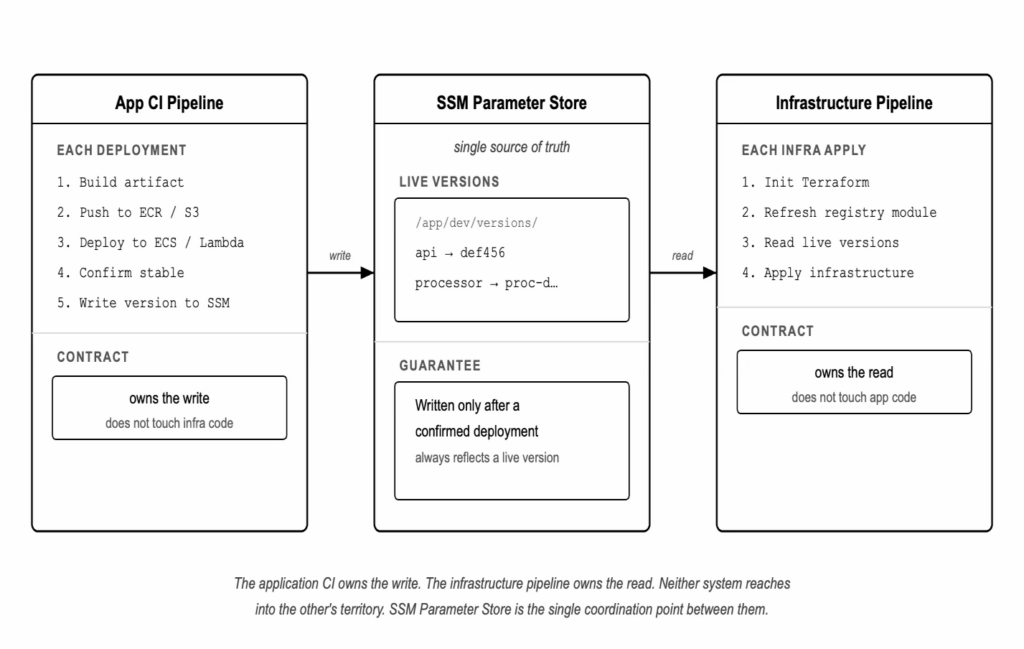
The following diagram shows how the workflows leverage SSM Parameter Store as a version registry:
The Application’s Role
The version registry only works if something writes to it. That responsibility belongs to the application CI.
After every successful deployment, the application workflow writes the deployed version to SSM. For an ECS service, the version is the Git commit SHA used as the image tag. For a Lambda function, it is the S3 object key of the deployment package. The write happens after the artifact is confirmed deployed, not before, not speculatively. If the deployment fails, SSM is not updated. The registry always reflects a version that is known to have deployed successfully.s own pace.
This is the contract between the two systems. The application CI owns the write. The infrastructure code owns the read. Neither system reaches into the other’s territory.pull request.
The ECS Deployment Workflow
The code samples in the following sections come from a companion repository with a full working implementation. Here’s the full deploy-api.yml workflow:
name: Deploy API
on:
push:
branches: [main]
paths: [“apps/api/**”]
workflow_dispatch:
# In a real setup, apps/api/ would live in its own repository and this
# workflow would be at the root of that repo. It is co-located here for
# the purposes of the blog sample.
permissions: {}
jobs:
deploy:
runs-on: ubuntu-latest
env:
IMAGE_TAG: ${{ github.sha }}
permissions:
id-token: write # required for OIDC role assumption
contents: read
steps:
– name: Checkout
uses: actions/checkout@de0fac2e4500dabe0009e67214ff5f5447ce83dd # v6.0.2
– name: Configure AWS credentials
uses: aws-actions/configure-aws-credentials@ec61189d14ec14c8efccab744f656cffd0e33f37 # v6.1.0
with:
role-to-assume: ${{ secrets.AWS_ROLE_ARN }}
aws-region: ${{ vars.AWS_REGION }}
– name: Log in to Amazon ECR
id: ecr-login
uses: aws-actions/amazon-ecr-login@19d944daaa35f0fa1d3f7f8af1d3f2e5de25c5b7 # v2.1.4
– name: Build and push container image
env:
ECR_REGISTRY: ${{ steps.ecr-login.outputs.registry }}
run: |
if aws ecr describe-images \
–repository-name “${{ vars.PROJECT_NAME }}-api” \
–image-ids “imageTag=$IMAGE_TAG” > /dev/null 2>&1; then
echo “Image $IMAGE_TAG already exists in ECR — skipping build and push”
else
docker build \
–platform linux/amd64 \
–tag “$ECR_REGISTRY/${{ vars.PROJECT_NAME }}-api:$IMAGE_TAG” \
./apps/api
docker push “$ECR_REGISTRY/${{ vars.PROJECT_NAME }}-api:$IMAGE_TAG”
fi
– name: Register new ECS task definition revision
id: register-task
env:
ECR_REGISTRY: ${{ steps.ecr-login.outputs.registry }}
run: |
CURRENT=$(aws ecs describe-task-definition \
–task-definition “${{ vars.PROJECT_NAME }}-api” \
–query taskDefinition \
–output json)
# Select the target container by name so sidecars do not interfere.
UPDATED=$(echo “$CURRENT” | jq \
–arg IMAGE “$ECR_REGISTRY/${{ vars.PROJECT_NAME }}-api:$IMAGE_TAG” \
–arg NAME “api” \
‘del(.taskDefinitionArn,.revision,.status,.requiresAttributes,.compatibilities,.registeredAt,.registeredBy)
| (.containerDefinitions[] | select(.name == $NAME)).image = $IMAGE’)
TASK_DEF_ARN=$(aws ecs register-task-definition \
–cli-input-json “$UPDATED” \
–query taskDefinition.taskDefinitionArn \
–output text)
echo “task_def_arn=$TASK_DEF_ARN” >> “$GITHUB_OUTPUT”
– name: Update ECS service
run: |
aws ecs update-service \
–cluster “${{ vars.PROJECT_NAME }}-cluster” \
–service “api” \
–task-definition “${{ steps.register-task.outputs.task_def_arn }}”
aws ecs wait services-stable \
–cluster “${{ vars.PROJECT_NAME }}-cluster” \
–services “api”
– name: Write version to SSM
run: |
aws ssm put-parameter \
–name “/app/${{ vars.ENVIRONMENT }}/versions/api” \
–value “$IMAGE_TAG” \
–type “String” \
–overwrite
A few things are worth calling out.
Action versions are pinned to SHA hashes. Each uses: line references a 40-character commit SHA rather than a mutable version tag. A version tag like v4 can be moved to point to different code at any time. A SHA is immutable. This is a supply chain security practice. If a tag is compromised after you pin it, your workflow is unaffected. With supply chain attacks against open-source actions becoming increasingly common, this practice meaningfully reduces your exposure.
AWS authentication uses OIDC. The configure-aws-credentials action assumes an IAM role via the GitHub OIDC provider rather than using long-lived access keys stored as secrets. The role is scoped to the specific AWS actions the workflow requires. No AWS credentials are stored in GitHub. The README.md in the companion repository covers this in additional detail.
The SSM write happens last, after the ECS service is confirmed stable. This is the registry contract. SSM reflects a version that has been successfully deployed, not just built or pushed. If the ECS update fails, the workflow stops and SSM is not updated. The previous SSM value, pointing to the last known good deployment, remains in place.
Task definition registration uses jq to swap the image. The workflow fetches the current task definition, strips the read-only fields that would cause the registration to fail, replaces the image on the target container by name, and registers a new revision. Selecting the container by name rather than by index means the logic is safe when sidecars are present.
The Lambda Deployment Workflow
The full deploy-processor.yml workflow:
name: Deploy Processor
on:
push:
branches: [main]
paths: [“apps/processor/**”]
workflow_dispatch:
# In a real setup, apps/processor/ would live in its own repository and this
# workflow would be at the root of that repo. It is co-located here for
# the purposes of the blog sample.
permissions: {}
jobs:
deploy:
runs-on: ubuntu-latest
env:
IMAGE_TAG: ${{ github.sha }}
permissions:
id-token: write # required for OIDC role assumption
contents: read
steps:
– name: Checkout
uses: actions/checkout@de0fac2e4500dabe0009e67214ff5f5447ce83dd # v6.0.2
– name: Configure AWS credentials
uses: aws-actions/configure-aws-credentials@ec61189d14ec14c8efccab744f656cffd0e33f37 # v6.1.0
with:
role-to-assume: ${{ secrets.AWS_ROLE_ARN }}
aws-region: ${{ vars.AWS_REGION }}
– name: Package Lambda function
working-directory: apps/processor
run: zip “processor-${IMAGE_TAG}.zip” handler.py
– name: Upload package to S3
run: |
aws s3 cp \
“apps/processor/processor-${IMAGE_TAG}.zip” \
“s3://${{ vars.PROJECT_NAME }}-lambda-packages/processor-${IMAGE_TAG}.zip”
– name: Update Lambda function code
run: |
if aws lambda get-function –function-name “${{ vars.PROJECT_NAME }}-processor” > /dev/null 2>&1; then
aws lambda update-function-code \
–function-name “${{ vars.PROJECT_NAME }}-processor” \
–s3-bucket “${{ vars.PROJECT_NAME }}-lambda-packages” \
–s3-key “processor-${IMAGE_TAG}.zip”
aws lambda wait function-updated \
–function-name “${{ vars.PROJECT_NAME }}-processor”
else
echo “Lambda function does not exist yet — skipping update. Terraform will deploy it on the next infra-apply.”
fi
– name: Write version to SSM
run: |
aws ssm put-parameter \
–name “/app/${{ vars.ENVIRONMENT }}/versions/processor” \
–value “processor-${IMAGE_TAG}.zip” \
–type “String” \
–overwrite
The structure mirrors the ECS workflow. It packages the function, uploads to S3, updates the function, and writes the S3 object key to SSM only after the update is confirmed.
The S3 key written to SSM is the full object key, processor-<sha>.zip, not just the SHA. Terraform’s s3_existing_package block needs the full key, so that is what the registry stores.
The update-function-code step checks whether the Lambda function exists before attempting the update. This handles the bootstrap scenario. On initial setup or after a full teardown, the Lambda function does not exist until Terraform creates it. The S3 upload completes successfully, giving Terraform everything it needs to create the function on its next apply, and SSM is written after the artifact is in place so it reflects only versions that have been confirmed deployed. In normal operation, the function exists and the update runs unconditionally.
This workflow updates $LATEST directly. Teams using Lambda aliases for blue/green or weighted traffic shifting will need to extend the pattern to also track the published version number alongside the S3 key.
Why the Infra Pipeline Refreshes the Registry First
Terraform stores the output of the version registry module in state. The version_map output, a map of service names to deployed versions, is persisted to the state file on each apply.
Between infrastructure applies, the application CI may deploy new versions and update SSM. Terraform’s state still reflects the versions from the last apply. If the infra pipeline runs a full terraform apply without first refreshing the registry module, Terraform computes its plan using the stale values in state. The plan may show a spurious diff on the image tag or Lambda S3 key, or in the case of the Lambda module, it may attempt to reconcile to a version that no longer matches what CI has deployed.
The fix is a targeted apply on the version registry module before the full apply:
terraform apply -target=module.version_registry -auto-approve
terraform apply -auto-approve
The targeted apply reads the current SSM parameters and updates state. The full apply that follows computes its plan from the refreshed values. The deployed versions in SSM match what is actually running, so the plan shows no diff on image tags or S3 keys.
In this sample, the targeted apply is not strictly necessary because the version registry module lives in the same Terraform root as the rest of the infrastructure. A plain terraform apply would read SSM directly and arrive at the same result. The two-step apply sequence is included because it reflects the pattern you would need to follow in a real-world setup where the version registry is deployed as a separate unit. In that case, the registry must be applied first so its outputs are available to the deployments that depend on them. HashiCorp flags -target as appropriate for exactly this kind of scenario where it is necessary to refresh data inputs that downstream resources depend on at plan time.
The Infrastructure Pipeline
The full infra-apply.yml workflow:
name: Apply Infrastructure
on:
push:
branches: [main]
paths: [“infra/**”]
workflow_dispatch:
# Prevent concurrent applies. cancel-in-progress: false means a second
# triggered run queues rather than cancels, so no two applies ever race
# on the same state file. This removes the need for a DynamoDB lock table.
concurrency:
group: terraform-apply
cancel-in-progress: false
permissions: {}
jobs:
apply:
runs-on: ubuntu-latest
permissions:
id-token: write # required for OIDC role assumption
contents: read
steps:
– name: Checkout
uses: actions/checkout@de0fac2e4500dabe0009e67214ff5f5447ce83dd # v6.0.2
– name: Configure AWS credentials
uses: aws-actions/configure-aws-credentials@ec61189d14ec14c8efccab744f656cffd0e33f37 # v6.1.0
with:
role-to-assume: ${{ secrets.AWS_ROLE_ARN }}
aws-region: ${{ vars.AWS_REGION }}
– name: Setup Terraform
uses: hashicorp/setup-terraform@5e8dbf3c6d9deaf4193ca7a8fb23f2ac83bb6c85 # v4.0.0
with:
terraform_version: “1.5.7”
– name: Terraform init
working-directory: infra
run: |
terraform init \
-backend-config=”bucket=${{ vars.TF_STATE_BUCKET }}” \
-backend-config=”key=terraform.tfstate” \
-backend-config=”region=${{ vars.AWS_REGION }}”
# Apply the version registry first. This refreshes Terraform’s view of
# the SSM parameters so that the current deployed versions — written by
# application CI — are in state before anything else is planned or applied.
# Without this step, Terraform’s state can lag behind the live SSM values
# and produce a spurious diff on the image tag or Lambda S3 key.
– name: Refresh version registry
working-directory: infra
run: terraform apply -target=module.version_registry -auto-approve
– name: Apply all infrastructure
working-directory: infra
run: terraform apply -auto-approve
Two design decisions are worth explaining.
The S3 backend uses partial configuration. The main.tf file contains only backend “s3” {} with no bucket name or region. Those values are passed as -backend-config flags at terraform init time, read from GitHub Actions variables. This keeps environment-specific values out of source control and makes the sample portable. Anyone can clone it, set their own TF_STATE_BUCKET variable, and run it without modifying any Terraform files. In production, this pattern also makes it straightforward to use different state buckets per environment without branching the Terraform code. key.
Concurrent applies are prevented with a concurrency group. The cancel-in-progress: false setting means a second workflow run triggered while one is already running will queue rather than cancel. No two applies ever race on the same state file. This sample does not use a DynamoDB lock table. Terraform 1.5.x requires DynamoDB for S3 backend locking, and Terraform 1.10+ adds native S3 locking without DynamoDB. For a single-environment sample, the GitHub Actions concurrency group provides equivalent safety without the additional infrastructure. Production setups running Terraform 1.5.x should add a DynamoDB table.ied is increasingly out of date.
Why Not ignore_changes?
A reader familiar with Terraform will reach for ignore_changes as a solution to version drift. Two variants come up in practice, and both are worth addressing.
The first is ignore_changes = [task_definition] on the ECS service resource. This prevents Terraform from reverting the service to an older task definition revision after the application CI has deployed a newer one. The version drift problem appears to go away. However, the stale version is still hardcoded in the Terraform file. Remove ignore_changes and the drift comes back on the next apply. It is not a fix. It is Terraform looking away.
The second is ignore_changes = [container_definitions] on the task definition resource itself. This prevents Terraform from registering new revisions when the image changes, which stops the rollback. However, it also stops any legitimate image update through Terraform. If you need to change the container image for any reason, such as updating a base image, patching a vulnerability, or onboarding a new service, Terraform cannot help you. The task definition’s most important attribute is now effectively unmanaged. You have not solved the problem. You have hidden it.
There is a deeper problem with both variants. Lifecycle blocks in Terraform cannot reference variables or expressions and must be statically defined. This means a module author cannot expose ignore_changes as behavior that consumers opt into.
In practice, production infrastructure code uses community-vetted modules rather than raw resources. Writing your own Terraform modules from scratch is rarely the right call when the ecosystem already provides well-tested options. This sample uses raw resources for the ECS task definition and service to keep the code readable, but the Lambda function is managed through a public module. That is precisely the point. You cannot add a lifecycle block to a resource inside that module. The workaround that appeared to work for the raw ECS resources is not available at all for Lambda without forking the module or dropping down to raw resources yourself. It is not a pattern that scales.
The SSM registry solves the actual problem. It replaces the stale hardcoded version with a live lookup, so Terraform’s plan reflects what is actually running. There is nothing to suppress.
This division is deliberate. Terraform remains the source of truth for every other aspect of the task definition, including CPU, memory, environment variables, and the task role. The SSM registry handles the one attribute that the application CI owns, the image. Without ignore_changes, infrastructure applies that touch the task definition will trigger an ECS rolling update. Because the image comes from SSM and reflects what is actually running, ECS replaces old containers with new ones running the same image, waits for them to be healthy, and drains the old ones. This is what ECS is designed to do.
What the Plan Looks Like
On first apply after a fresh deployment, the plan output for the Lambda function will show a change on the S3 key:
# module.processor.aws_lambda_function.this[0] will be updated in-place
~ resource “aws_lambda_function” “this” {
~ s3_key = “processor-abc1234def5.zip” -> “processor-def5678abc1.zip”
}
This is the pattern working correctly. The version registry refresh read the current key from SSM, written by deploy-processor, and updated state. The full apply reconciles the Lambda function to match. On subsequent applies where no deployment has occurred, this diff does not appear.with a live lookup.
The ECS task definition shows a similar reconciliation on first apply:
# aws_ecs_task_definition.api must be replaced
-/+ resource “aws_ecs_task_definition” “api” {
~ container_definitions = “[{\”image\”:\”…api:abc1234\”,…}]” -> (known after apply) # forces replacement
~ revision = 7 -> (known after apply)
}
Terraform registers a new task definition revision with the SHA from SSM and updates the ECS service to point to it. As described in the previous section, ECS performs a rolling update. New containers running the same image are health-checked and the old ones are drained. After this first reconciliation, subsequent applies where the SHA has not changed produce no diff.
Rollback
Two options are available when a bad deployment needs to be undone.
The faster option is to re-run the deployment workflow against a known-good commit SHA. Pass the target SHA as a workflow input or manually trigger the workflow from a specific commit. The workflow builds the old image, pushes it, writes the SHA to SSM, and updates ECS or Lambda. Terraform is not involved.
The alternative for ECS is to repoint the service directly to an earlier task definition revision using the AWS CLI:
aws ecs update-service \
–cluster <cluster-name> \
–service <service-name> \
–task-definition <family>:<revision>
aws ecs wait services-stable \
–cluster <cluster-name> \
–services <service-name>n.
This gets the service running the old code immediately. Follow it with a re-run of the deployment workflow against the known-good SHA to update SSM and restore consistency. If SSM is left pointing to the bad SHA, the next infrastructure apply will reconcile toward it.
Operational Notes
SSM Parameter Store retains the history of every value written to a parameter. The AWS console shows version history with timestamps under the parameter’s history tab, though it may not display the value for each historical version. The full sequence of deployed SHAs, including values, is reliably available via aws ssm get-parameter-history. Either way, you get a timestamped record of every deployment without any additional tooling.at need a version reference.
SSM Standard parameters are free. There is no charge for storing parameters, reading them with GetParametersByPath, or writing to them with PutParameter. The version registry adds no cost to running this pattern.
There is a narrow timing window between the version registry refresh and the full apply during which a deploy workflow could complete and write a newer version to SSM. If that happens, the full apply uses the version the refresh captured. The next infrastructure apply will reconcile forward correctly. In practice this window is seconds wide, but it is worth knowing about if the infra pipeline and a deploy workflow are triggered simultaneously.
The SSM write is the last step in each deploy workflow and is not retried on transient failure. If it fails after a successful deployment, the running service is at the new version but SSM still reflects the old one. The next infrastructure apply will reconcile toward the stale SSM value. Monitoring the SSM write step and alerting on failure closes this gap.
Adding a service to the registry requires two steps. The application CI workflow writes its version to an SSM parameter under the shared path prefix, and the infrastructure code adds a lookup on module.version_registry.version_map for the new service name. The registry module reads all parameters under the prefix in a single API call. A new service appears in the map automatically on the next apply after its first deployment writes to SSM. There is no list of service names to maintain in the Terraform code.
At Scale
The sample repository consolidates what would normally be three separate repositories (infrastructure, API application, and processor) into a single repo for clarity. In production, each application repository carries its own deployment workflow. The infrastructure repository is separate. The SSM path prefix provides the coordination point between them.
Gridline‘s production implementation runs this pattern across multiple application repositories and AWS environments. The SSM Registry Pattern eliminated the risk of an incident caused by an infrastructure apply overwriting a live deployment. The core module is identical to what is described in this series. The operational scaffolding around it, including environment promotion, pipeline sequencing, and state management, is handled by the surrounding CI infrastructure.
The full working sample, verified against a live AWS environment, is at github.com/sms-data-products/blog-terraform-ssm-version-registry.
The Full Pattern
The two posts in this series trace the SSM Registry Pattern from both sides of the deployment boundary.
Part 1 replaced hardcoded application versions in Terraform with live lookups from SSM, eliminating version drift as a source of silent rollbacks. Part 2 wired up the application workflows that keep SSM current and the infrastructure pipeline that reads from it before applying.
With both in place, application deployments and infrastructure changes run on independent schedules; however, they stay in sync. A module version bump generates a plan that shows only what the bump changes. Application versions are not in the diff.
The natural extensions from here are environment promotion, deliberately writing a validated version to a staging or production SSM path, and adding new services, each of which requires only a deployment workflow that writes to SSM and a lookup in the infrastructure code.
The full working sample, verified against a live AWS environment, is at github.com/sms-data-products/blog-terraform-ssm-version-registry.
Disclaimer: The code samples and architecture described in this post are drawn from a public sample repository at github.com/sms-data-products/blog-terraform-ssm-version-registry, built to illustrate the pattern. They do not represent Gridline‘s actual production configuration.
About Gridline
Gridline is a turnkey private markets platform built to set a new standard for how RIAs operate, manage, and scale alternatives.
We partner with RIAs to make private markets operate as simply as public markets.
Our portfolio management capability gives advisors real-time visibility across every client and every investment, so you’re not waiting on quarter-end reports to understand exposures, performance, or cash flow dynamics. You can drill down by client, fund, or strategy to see the full picture, strengthen transparency, and make faster, better-informed decisions with confidence.
Because the data is always current, meeting prep shrinks and client conversations elevate. Reports are ready when you are. They are clear, accurate, and easy to share, turning portfolio complexity into insight clients can trust.
Where most solutions layer tools on top of fragmented workflows, Gridline is built as core infrastructure: one system that runs the full private markets lifecycle. Gridline centralizes every commitment, capital call, valuation, distribution, and document into a single, always-on source of truth, replacing spreadsheets, portals, and PDFs with an always-on, always-up-to-date source of truth that’s available the moment you need it.
The result is a competitive edge that helps you scale, differentiate your firm, and deliver a modern client experience.
This is what it means to set a new standard for alternative investing.
Book a call to see how Gridline helps you scale alternatives without scaling complexity.
About the Authors

Christopher Jones is a Senior Software Engineer at Gridline specializing in resilient, high-performance back-end systems for the financial industry. Since transitioning into software engineering in 2020, he has focused on building reliable, scalable software and infrastructure for mission-critical environments. He developed deep expertise in Infrastructure as Code by creating engineering patterns that improve operational reliability, consistency, and long-term maintainability.

Rob Stewart has over 25 years of experience driving technology innovation. As a cloud architect at SMS, he spearheads the design and implementation of cutting-edge cloud solutions for government and private sector customers, unlocking efficiency and scalability. Prior to SMS, Rob led a global team developing a learning management platform deployed on AWS and was instrumental in driving the adoption of modern devops practices resulting in a dramatic increase in the consistency of software delivery. He is an accredited expert in cloud technologies, with multiple AWS, Azure and Kubernetes certifications. In his free time, he enjoys spending time with his family and two cats.